

Eye Relief Tips for Hybrid and Remote Workers
The year 2020 marked a new era of work for many people across the globe. As the COVID-19 pandemic sent most office workers home, remote work became the reality across most industries. And, for many of us, this has become the “new normal.” After all, once companies realized how much money they could save by not renting office space, and once workers realized the benefits of not commuting every day, many pushed for continued remote or, at the very least, hybrid schedules.
While this setup has benefited many workers’ health in a variety of ways, from more time for exercise and healthy eating to more time with family, there is one part of our bodies it hasn’t benefited as much: our eyes. Spending so much time on our screens for both work and leisure increases the risk of developing digital eye strain, or DES. In fact, over 60 percent of Americans suffer from this condition. This condition can cause anything from dry eye and blurry vision to light sensitivity. Luckily, there is a lot you can do to mitigate the symptoms of this condition. These remote work eye relief tips can help relieve stress on your vision, no matter your stage of life.
Symptoms of Digital Eye Strain
You probably can already tell whether spending so much time on a screen is negatively impacting your vision or not. If your eyes generally feel tired during and after a long day of work, they could do with some rest. However, here are some more tell-tale symptoms of digital eye strain:
- Red and or irritated eyes
- Headaches
- Dry eyes
- Blurred vision while looking at the screen or device
- Pain in the neck or back
But what is actually happening in the eye to cause these symptoms? It all comes down to the small ciliary muscles surrounding your eye. When you engage in too much focused work, like working on a computer for many hours a day, these muscles become fatigued. This causes a variety of physiological responses that can actually make working from home unpleasant. After all, there aren’t any prescribed (or unprescribed) breaks around the water cooler with your coworkers if you aren’t working in the office all day with them. Unfortunately, it is your eyes that pay the price for the lack of regular breaks they are given during remote work.
This is in part because it is difficult for your eyes to even blink normally while you are working on a screen. It is widely established that digital device usage causes a change in blink patterns. These changes include decreased blink rates and more incomplete eyelid closure. Because your eyes don’t even get this normal, split-second respite during long periods of working on a screen, they get fatigued, leading to a variety of unpleasant symptoms.
Tips for Remote Workers to Reduce Digital Eye Strain
 Luckily, these tips can go a long way in preventing digital eye strain from becoming too severe. Both remote and hybrid workers can implement these remote work eye relief tips and tricks into their workday to make sure their eyes still have the energy to enjoy leisure activities in the evening.
1. Optimize Your Workspace Lighting
While you may not be able to control how much of your workday is spent on a screen, you can certainly do a lot to make your workspace more amenable to your eyes, thereby allowing you to reduce eye strain.
One of the best things you can do is improve the lighting in your space. Proper workplace lighting is crucial for improving visual efficiency, safety, productivity, and worker health. The first thing you want to do is ensure there are no light sources pointing directly at your face, like a typical desk lamp. Instead, point the bulb and shade away from your face for optimal results. As for ambient lighting, it is best to have more intense light in your workspace (like a lamp) and softer light throughout the rest of the room.
You will also want to avoid having any harmful glare on your screen. If there is a glare that is making it difficult for you to get your work done, it’s no surprise that this glare is actually harmful to your eyes. If you do experience glare at your home office, either move your desk so that you are facing a different direction or consider investing in an anti-glare film you can install on top of your screen. Adjusting lighting appropriately can go a long way in providing eye strain relief.
2. Find the Best Screen Position
Similarly to finding the best lighting, it’s also vitally important that you adjust your screen distance to the optimal position. Doing so can also provide eye pain relief.
According to the American Optometric Association, the best position for your screen is 20–28 inches away from your eyes. The angle between your eyes and your screen also matters – they recommend 15–20 degrees below eye level. This is because it reduces the exposed ocular surface area, which in turn reduces your risk of developing dry eye. This alone can go a long way in reducing working-from-home eye strain.
3. Incorporate Eye Exercises
Another great thing you can do to promote remote work wellness is to incorporate eye exercises into your work routine. There are a few eye exercises you can do anywhere that will have a positive impact on your vision.
- Near-and-Far Focus: Hold your thumb 10 inches from your face, focus for 15 seconds, then focus on an object 10–20 feet away for 15 seconds. Repeat 5–6 times.
- Eye Rolls: Sit up straight, slowly roll your eyes clockwise, then counter-clockwise. Repeat 10 times, twice a day.
- Vertical/Horizontal Tracking: Move your eyes slowly up and down, then left and right, three times.
- Conscious Blinking: Close your eyes, pause for two seconds, then open them to lubricate your eyes.
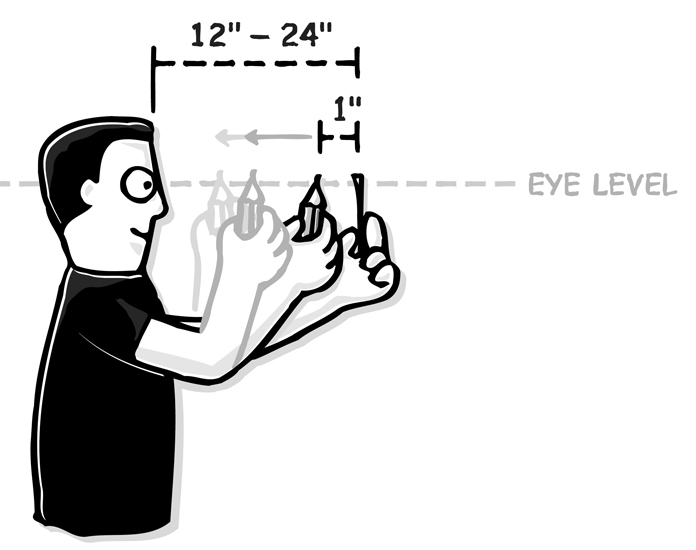
- Pencil Pushups: Hold a pencil at arm’s length, focus on it, and slowly bring it toward your nose until it blurs or becomes double, then move it away.
- Figure Eights: Imagine a large figure eight on the floor, 10 feet away, and trace it with your eyes
These and other eye exercises for tired computer users don’t take much time and are a great alternative to picking up your phone to scroll between work tasks. While this is one of those remote work eye relief tips that is more proactive than reactive, it can make a huge difference in the future of your visual health.
4. Try Eye Comfort Strategies
Finally, you can try incorporating some eye comfort strategies to relieve eye strain. One easy one is adding a humidifier to your workspace. Moist air will help keep your eyes lubricated.
You can also try palming if your eyes are feeling particularly tired. Cover your closed eyes with warm palms (perhaps after rubbing them together for a little while). This can help soothe strained eyes.
And you can also consider getting some blue light glasses or installing a blue light filter on your screen. They can provide relief on days your eyes are feeling extra tired.
One thing is clear: the connection between remote work and vision cannot be ignored. By trying these simple tips, you can do a lot to relieve the negative impact that too much screen time may be having on your eyes and ensure you have strong, clear vision for years to come.



please let me know which is the best to buy all natural vitamins or
all natural daily multivtamins or both
The main difference comes down to what you are looking for.
The Rebuild Your Vision Ocu-Plus Formula is designed specifically for the eyes, making it a great choice if you are looking for nutrients that support overall eye health.
Our Daily Multivitamins, on the other hand, include the Rebuild Your Vision Ocu-Plus Formula and also cover a broader range of daily nutrients.
If you are looking for targeted eye support, go with the Rebuild Your Vision Ocu-Plus Formula. If you want more comprehensive daily nutritional coverage, the All Natural Daily Multivitamins are the way to go.
https://www.rebuildyourvision.com/store/